
フォームの送信後に表示されるサンクスページは、送信が正常に完了したことを伝えるだけでなく、返信までの目安や自動返信メールについて案内したり、別のページへ誘導したりする役割もあります。
今回は、HTMLとCSSをコピペして使えるサンクスページデザインを4種類紹介します。
企業サイトや個人サイト、お申し込みフォームなど、用途に合わせてカスタマイズしてみてください。
目次
サンクスページに入れておきたい内容
お問い合わせ送信後のサンクスページには、次のような内容を入れておくと親切です。
フォームの用途によっては、電話番号や営業時間、よくある質問へのリンクなどを追加するのもおすすめです。
1.シンプルなお問い合わせ送信完了ページ
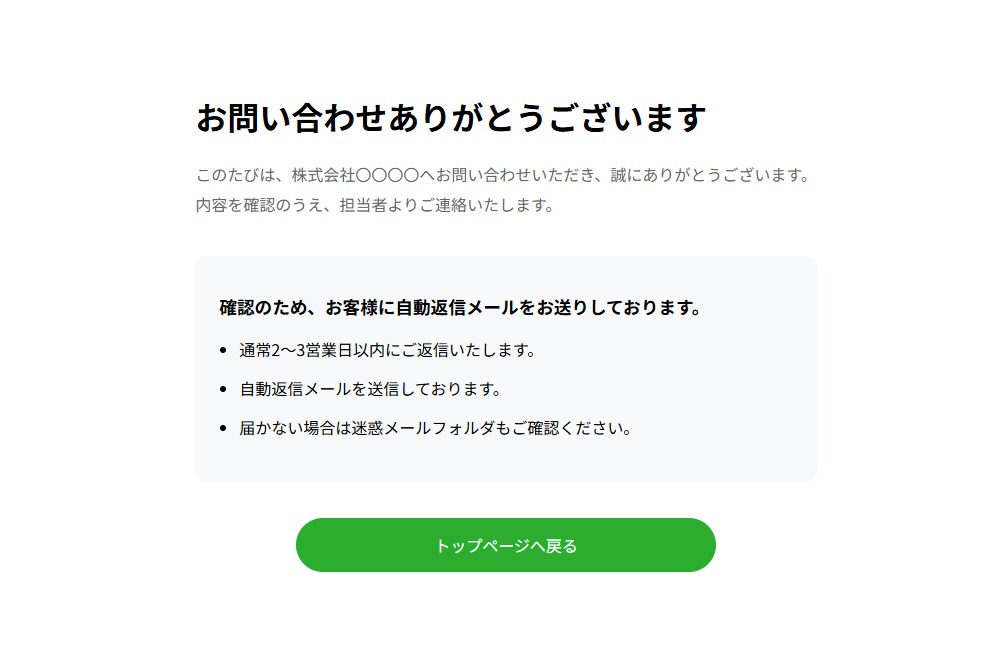
まずは、さまざまなWebサイトに合わせやすいシンプルなサンクスページです。
メッセージを中央に配置し、お問い合わせが正常に送信されたことがひと目で分かるデザインにしています。
HTML
<!doctype html>
<html lang="ja">
<head>
  <meta charset="UTF-8">
  <meta name="viewport" content="width=device-width, initial-scale=1.0">
	<meta name="description" content="">
	<meta name="keywords" content="">
  <link href="./style.css?717" rel="stylesheet">
  <title>サンクスページ01</title>
  </head>
  <body>
  <main>
<div class="container">
    <div class="container-box">

        <h1>お問い合わせありがとうございます</h1>

        <p class="lead">
            このたびは、株式会社〇〇〇〇へお問い合わせいただき、誠にありがとうございます。<br>
            内容を確認のうえ、担当者よりご連絡いたします。
        </p>

        <div class="info-box">
            <h2>確認のため、お客様に自動返信メールをお送りしております。</h2>
            <ul>
                <li>通常2〜3営業日以内にご返信いたします。</li>
                <li>自動返信メールを送信しております。</li>
                <li>届かない場合は迷惑メールフォルダもご確認ください。</li>
            </ul>
        </div>

        <div class="btn">
        <a href="#">
            トップページへ戻る
        </a>
      </div>

    </div>
</div>
  </main>
  </body>
  </html>
CSS
  * {
  box-sizing: border-box;
}
body{
      margin: 0;
      padding: 0;
  font-size: 16px;
    }

    .container{
    min-height: 100vh;
    min-height: 100svh;
    display:flex;
    justify-content:center;
    align-items:center;
}


h1{
    font-size:2rem;
    margin-bottom:20px;
}

.lead{
    color:#666;
    line-height:1.9;
    margin-bottom:36px;
}

.info-box{
    background:#f8f9fa;
    border-radius:12px;
    padding:24px;
    text-align:left;
    margin-bottom:36px;
}

.info-box h2{
    font-size:1.1rem;
    margin-bottom:16px;
}

.info-box ul{
    padding-left:20px;
}

.info-box li{
    margin-bottom:10px;
    line-height:1.8;
}

.btn{
  display: flex;
  justify-content: center;
}
.btn a{
    padding: 15px 5px;
    max-width: 410px;
    width: 100%;
    text-align: center;
    background:#1aad2e;
    color:#fff;
    border-radius: 100vh;
    -webkit-transition: all .3s;
    transition: all .3s;
    text-decoration: none;
}

.btn a:hover{
    background:#169427;
}

@media (max-width:768px){

    .container-box{
        padding:32px 24px;
    }

    h1{
        font-size:1.6rem;
    }

}
おすすめの用途
- 一般的なお問い合わせフォーム
- コーポレートサイト
- 個人事業主のWebサイト
- サービスサイト
2.企業サイト向けのサンクスページ
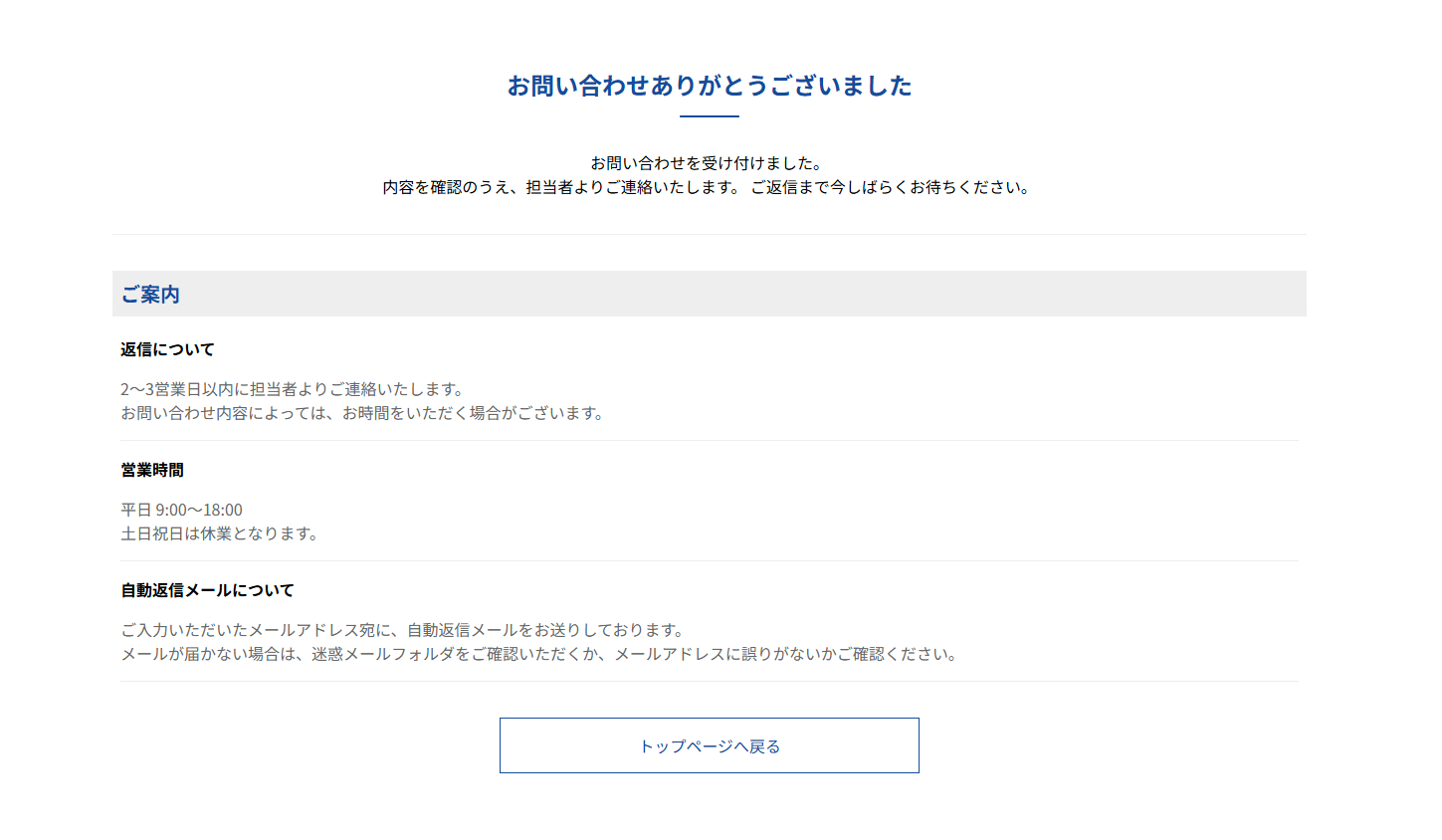
次は、ネイビーやグレーを基調とした、企業サイト向けの落ち着いたサンクスページです。
HTML
<!doctype html>
<html lang="ja">
<head>
  <meta charset="UTF-8">
  <meta name="viewport" content="width=device-width, initial-scale=1.0">
	<meta name="description" content="">
	<meta name="keywords" content="">
  <link href="./style.css?717" rel="stylesheet">
  <title>サンクスページ02</title>
  </head>
   <body>
    <main>
    <div class="container">

    <div class="tit_head">

    <h1>お問い合わせ<br class="sp-br">ありがとうございました</h1>

    <p>
    お問い合わせを受け付けました。<br>
    内容を確認のうえ、担当者よりご連絡いたします。
    ご返信まで今しばらくお待ちください。
    </p>

    </div>

    <h2>ご案内</h2>
    <ul class="info-box">

    <li>
      <h3>返信について</h3>
      <p class="lead">
      2〜3営業日以内に担当者よりご連絡いたします。<br>
      お問い合わせ内容によっては、お時間をいただく場合がございます。
      </p>
    </li>

    <li>
      <h3>営業時間</h3>
      <p class="lead">
      平日 9:00〜18:00<br>
      土日祝日は休業となります。
      </p>
    </li>

    <li>
      <h3>自動返信メールについて</h3>
      <p class="lead">
      ご入力いただいたメールアドレス宛に、自動返信メールをお送りしております。<br>
      メールが届かない場合は、迷惑メールフォルダをご確認いただくか、メールアドレスに誤りがないかご確認ください。
      </p>
    </li>

    </ul>

    <div class="btn">
      <a href="#">
      トップページへ戻る
      </a>
    </div>

    </div>
    </main>
    </body>
  </html>
CSS
  * {
  box-sizing: border-box;
}
body{
      margin: 0;
      padding: 0;
  line-height: 1.5;
  font-size: 16px;
    margin-top: 100px;
    }


h1{
    font-size:1.5rem;
  position: relative;
  display: block;
  margin-bottom: 2em;
  text-align: center;
  color: #154c9c;
}

h1:before {
  content: '';
  position: absolute;
  bottom: -15px;
  display: inline-block;
  width: 60px;
  height: 2px;
  left: 50%;
  -webkit-transform: translateX(-50%);
  transform: translateX(-50%);
  background-color: #154c9c;
  border-radius: 2px;
}
h2 {
    background:#eee;
  padding: 8px;
  margin-bottom: 1em;
  font-size: 1.25rem;
  color: #154c9c;
}
h3{
  font-size: 1rem
}
.tit_head{
  border-bottom: 1px solid #eee;
  margin-bottom:36px;
}
.tit_head p{
  margin-bottom:36px;
  text-align: center;
}
.container{
  max-width: 1200px;
  padding: 0 15px;
  margin: 0 auto;
}

.lead{
    color:#666;
}
ul.info-box{
  padding: 0 8px;
}
ul.info-box li{
  list-style: none;
  border-bottom:1px solid #eee;
}
ul.info-box li:last-child{
  margin-bottom: 36px;
}
.btn{
  display: flex;
  justify-content: center;
}
.btn a{
    padding: 15px 5px;
    max-width: 410px;
    width: 100%;
    text-align: center;
    background:#FFF;
  border: 1px solid #154c9c;
    color:#154c9c;
    -webkit-transition: all .3s;
    transition: all .3s;
    text-decoration: none;
}

.btn a:hover{
    background:#154c9c;
  color: #FFF;
}
@media (min-width: 768px) {
    .sp-br{
        display: none;
    }
}
おすすめの用途
- コーポレートサイト
- BtoBサービス
- 資料請求フォーム
3.おしゃれな雰囲気のサンクスページ
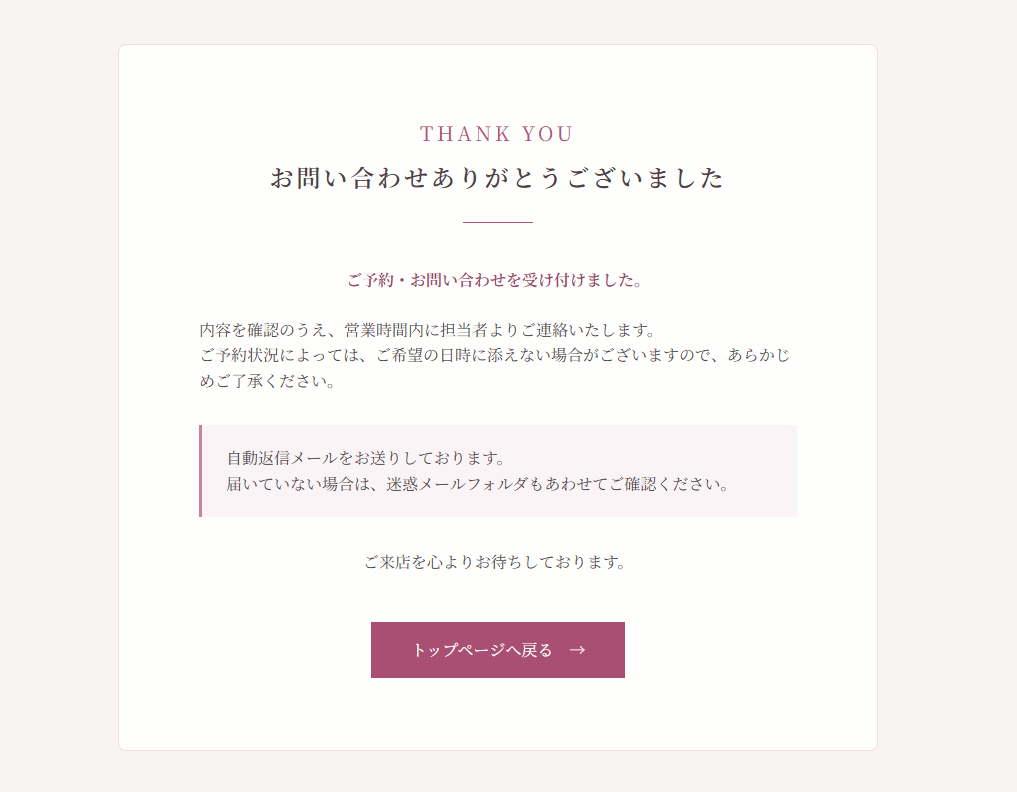
次は、淡い色とセリフ体のフォントを用いたデザインで、おしゃれな雰囲気のサンクスページです。
HTML
<!doctype html>
<html lang="ja">
<head>
  <meta charset="UTF-8">
  <meta name="viewport" content="width=device-width, initial-scale=1.0">
	<meta name="description" content="">
	<meta name="keywords" content="">
  <link href="./style.css" rel="stylesheet">
  <title>サンクスページ03</title>
  </head>
    <body>
<main>
    <div class="container">

      <div class="thanks-card">

        <div class="thanks-heading">
          <p class="thanks-en">Thank you</p>
          <h1>
            お問い合わせ<br class="sp-br">ありがとうございました
          </h1>
          <span class="thanks-line"></span>
        </div>

        <div class="thanks-message">
          <p class="thanks-lead">
            ご予約・お問い合わせを受け付けました。
          </p>

          <p>
            内容を確認のうえ、営業時間内に担当者よりご連絡いたします。<br>
            ご予約状況によっては、ご希望の日時に添えない場合がございますので、あらかじめご了承ください。
          </p>

          <div class="thanks-notice">
            <p>
              自動返信メールをお送りしております。<br>
              届いていない場合は、迷惑メールフォルダもあわせてご確認ください。
            </p>
          </div>

          <p class="thanks-end">
            ご来店を心よりお待ちしております。
          </p>
        </div>

        <div class="thanks-button">
          <a href="#">
            <span>トップページへ戻る</span>
          </a>
        </div>

      </div>

    </div>
    </main>
    </body>
  </html>
CSS
  * {
  box-sizing: border-box;
}
body {
  margin: 0;
  color: #51474b;
  line-height: 1.6;
  background-color: #f8f4f2;
  font-family: "Noto Serif JP", serif;
  font-size: 16px;
}

main {
  display: flex;
  min-height: 100vh;
  align-items: center;
  justify-content: center;
  padding: 0 16px;
}

.container {
  width: 100%;
  max-width: 760px;
  margin: 0 auto;
}

.thanks-card {
  background: rgba(255, 255, 255, 0.88);
  border: 1px solid rgba(179, 80, 121, 0.18);
    padding: 52px 16px;
    border-radius: 8px;
}

.thanks-heading {
  margin-bottom: 44px;
  text-align: center;
}

.thanks-en {
  font-size: 1.25rem;
  margin: 0 0 8px;
  color: #b35079;
  font-family: "Cormorant Garamond", serif;
  letter-spacing: 0.18em;
  text-transform: uppercase;
}

h1 {
  margin: 0;
  color: #4f4147;
  font-size: 1.5rem;
  font-weight: 600;
  letter-spacing: 0.12em;
  line-height: 1.7;
}

.thanks-line {
  display: block;
  position: relative;
  width: 70px;
  height: 1px;
  margin: 24px auto 0;
  background-color: #b35079;
}

.thanks-message p {
  margin-bottom: 24px;
}

.thanks-lead {
  color: #9a4568;
  font-weight: 600;
  text-align: center;
}

.thanks-notice {
  margin: 32px 0;
  padding: 20px 24px;
  background-color: #faf4f6;
  border-left: 3px solid #c9839f;
}

.thanks-notice p {
  margin: 0;
}

.thanks-end {
  margin-bottom: 0;
  text-align: center;
}

.thanks-button {
  margin-top: 48px;
  text-align: center;
}

.thanks-button a {
  display: inline-flex;
  position: relative;
  min-width: 240px;
  padding: 15px 40px;
  overflow: hidden;
  color: #fff;
  background-color: #a94f73;
  align-items: center;
  justify-content: center;
  text-decoration: none;
  transition: 0.3s;
}

.thanks-button a::after {
  content: "→";
  position: relative;
  z-index: 1;
  margin-left: 16px;
  transition: transform 0.3s;
}
.thanks-button a span {
  position: relative;
  z-index: 1;
}
.thanks-button a:hover::after {
  transform: translateX(5px);
}

@media (min-width: 768px) {
.thanks-card{
  padding: 72px 80px;
}
  .sp-br {
    display: none;
  }
}
おすすめの用途
- 美容室やサロン
- ハンドメイドショップ
- 個人向けサービス
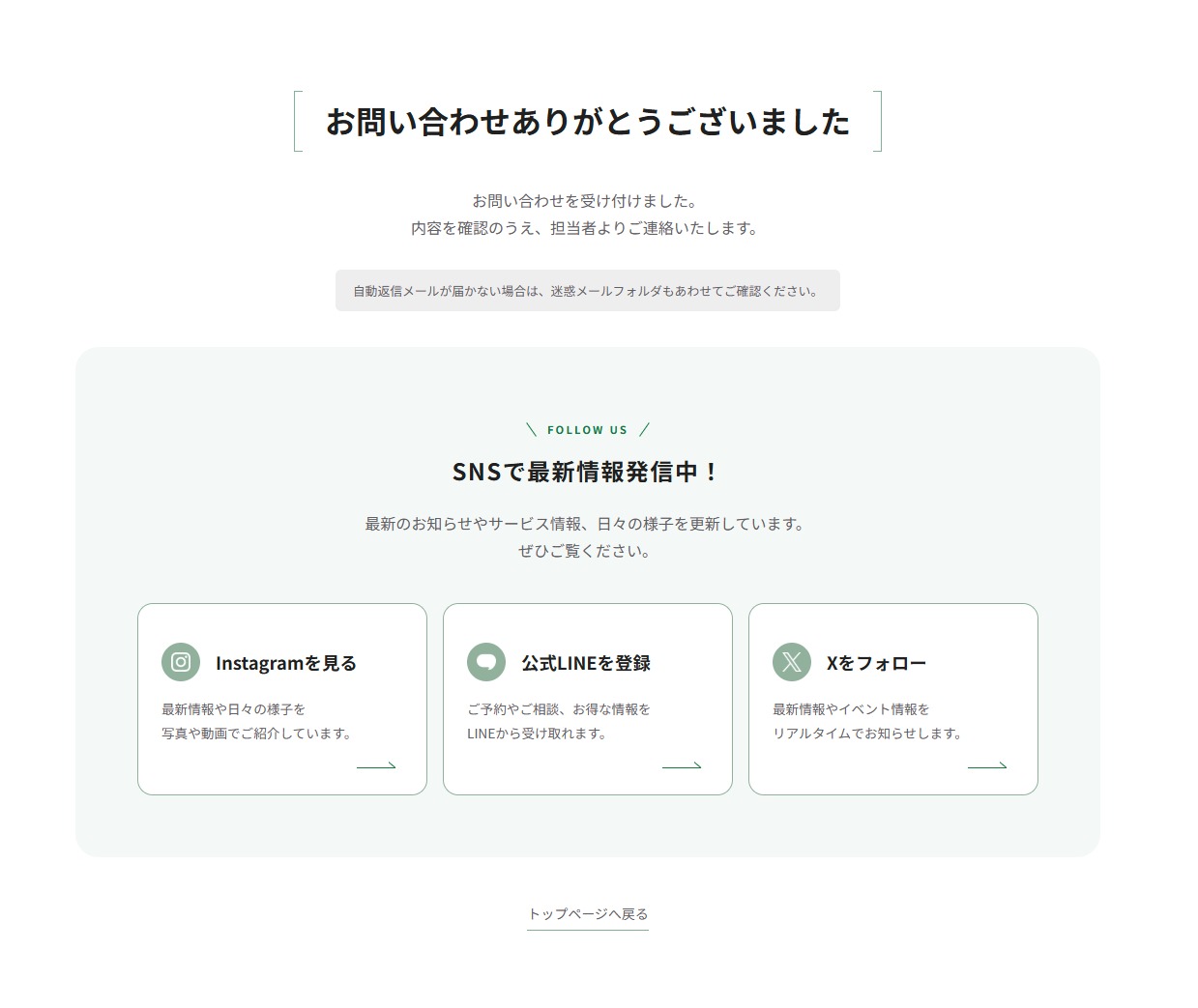
4.次のアクションへ誘導するサンクスページ
最後は、お問い合わせ完了後に別のページやサービスへ誘導できるサンクスページです。
トップページへ戻るボタンに加えて、サービス一覧、公式LINE、SNSなどへのリンクを配置します。お問い合わせ送信後にそのままページを閉じてもらうのではなく、SNSへの誘導、サイト内を回遊してもらいたい場合におすすめです。
HTML
<!doctype html>
<html lang="ja">
<head>
  <meta charset="UTF-8">
  <meta name="viewport" content="width=device-width, initial-scale=1.0">
	<meta name="description" content="">
	<meta name="keywords" content="">
  <link href="./style.css?717" rel="stylesheet">
  <title>サンクスページ04</title>
  </head>
    <body>
         <main class="thanks">

    <div class="thanks-container">

      <section class="thanks-message">


        <h1>
          お問い合わせ<br class="sp-br">ありがとうございました
        </h1>

        <p class="thanks-text">
          お問い合わせを受け付けました。<br>
          内容を確認のうえ、担当者よりご連絡いたします。
        </p>

        <p class="thanks-note">
          自動返信メールが届かない場合は、迷惑メールフォルダもあわせてご確認ください。
        </p>

      </section>

      <section class="social">

        <div class="social-heading">
          <p class="social-en">FOLLOW US</p>
          <h2>SNSで最新情報発信中!</h2>

          <p class="social-lead">
            最新のお知らせやサービス情報、日々の様子を更新しています。<br>
            ぜひご覧ください。
          </p>
        </div>

        <div class="social-list">

          <!-- Instagram -->
          <a href="#" class="social-card" target="_blank" rel="noopener noreferrer">

            <div class="social-card-body">
            <div class="social-card-icon">
              <img src="https://blog.tomorow-design.com/dir-cms/wp-content/uploads/2026/07/instagram_white-scaled.png">
            </div>
              <h3>Instagramを見る</h3>
            </div>

              <p class="social-card-text">
                最新情報や日々の様子を<br>
                写真や動画でご紹介しています。
              </p>

            <span class="social-card-arrow"></span>

          </a>

          <!-- LINE -->
          <a href="#" class="social-card" target="_blank" rel="noopener noreferrer">
            <div class="social-card-body">
            <div class="social-card-icon">
              <img src="https://blog.tomorow-design.com/dir-cms/wp-content/uploads/2026/07/fukisashi.png">
            </div>
              <h3>公式LINEを登録</h3>
            </div>
              <p class="social-card-text">
                ご予約やご相談、お得な情報を<br>
                LINEから受け取れます。
              </p>

            <span class="social-card-arrow"></span>

          </a>

          <!-- X -->
          <a href="#" class="social-card" target="_blank" rel="noopener noreferrer">

            <div class="social-card-body">
            <div class="social-card-icon">
              <img src="https://blog.tomorow-design.com/dir-cms/wp-content/uploads/2026/07/x-white.png">
            </div>

              <h3>Xをフォロー</h3>
            </div>

              <p class="social-card-text">
                最新情報やイベント情報を<br>
                リアルタイムでお知らせします。
              </p>

            <span class="social-card-arrow"></span>

          </a>

        </div>
      </section>

        <div class="thanks-back">
          <a href="#">トップページへ戻る</a>
        </div>

    </div>


  </main>
    </body>
  </html>
CSS
* {
  box-sizing: border-box;
}

html {
  font-size: 16px;
}

body {
  margin: 0;
  color: #202020;
  font-family: "Noto Sans JP", sans-serif;
  line-height: 1.8;
}
a {
  color: #202020;
}
.thanks-container {
  padding: 80px 20px;
  width: 100%;
  max-width: 1100px;
  margin: 0 auto;
}
.thanks p{
  color: #5e6065;
  font-size: 1rem;
}
.thanks-message{
  text-align: center;
}
h1 {
  position: relative;
  line-height: 1.4;
  padding:0.25em 1em;
  display: inline-block;
  top:0;
  font-size: clamp(1.5rem, 1.3239rem + 0.5634vw, 2rem);
}
h1:before, h1:after {
  position: absolute;
  top: 0;
  content:'';
  width: 8px;
  height: 100%;
  display: inline-block;
}
h1:before {
  border-left: solid 1px #81b39a;
  border-top: solid 1px #81b39a;
  border-bottom: solid 1px #81b39a;
  left: 0;
}
h1:after {
  content: '';
  border-top: solid 1px #81b39a;
  border-right: solid 1px #81b39a;
  border-bottom: solid 1px #81b39a;
  right: 0;
}
.thanks p.thanks-note {
  display: inline-block;
  padding: 10px 18px;
  color: #5e6065;
  background-color: #eee;
  border-radius: 6px;
  font-size: 0.8rem;
}
.social {
  margin-top: 24px;
  padding: 64px;
  background-color: #f4f8f6;
  border-radius: 24px;
}
.social-heading {
  margin-bottom: 40px;
  text-align: center;
}

.thanks p.social-en {
  color: #19793e;
  font-size: 0.7rem;
  font-weight: 600;
  letter-spacing: 0.2em;
  position: relative;
  text-align: center;
}
.thanks p.social-en:before,
.thanks p.social-en:after {
  position: relative;
  display: inline-block;
  content: "";
  background: #19793e;
  width: 1px;
  height: 1.5em;
  margin: 0 16px;
  margin-top: -0.2em;
  vertical-align: middle;
}
.thanks p.social-en:before {
  transform: rotate(-35deg);
}
.thanks p.social-en:after {
  transform: rotate(35deg);
}
.social h2 {
  margin: 0;
  font-size: clamp(1.25rem, 1.162rem + 0.2817vw, 1.5rem);
  font-weight: 600;
  letter-spacing: 0.06em;
}
.social-lead {
  margin: 18px 0 0;
}
.social-list {
  display: flex;
  justify-content: center;
  align-items: stretch;
  gap: 16px;
}
.social-card {
  width: calc(100% / 3);
  display: flex;
  flex-direction: column;
  position: relative;
  padding: 24px 24px 52px;
  overflow: hidden;
  background-color: #fff;
  border: 1px solid #91b19d;
  border-radius: 16px;
  text-decoration: none;
}
.social-card-body {
  display: flex;
  align-items: center;
  gap: 16px;
  margin: 16px 0;
}
.social-card-icon {
  display: flex;
  width: 40px;
  height: 40px;
  background-color: #91b19d;
  border-radius: 50%;
  align-items: center;
  justify-content: center;
  aspect-ratio: 1 / 1;
}
.social-card-icon img {
  width: 20px;
  height: 20px;
}
.social-card h3 {
  margin: 0;
  font-size: 1.15rem;
  font-weight: 600;
}
p.social-card-text  {
  margin: 0;
  color: #5e6065;
  line-height: 1.8;
  font-size: 0.85rem;
  margin-top: auto;
}
.social-card-arrow {
  position: absolute;
  right: 32px;
  bottom: 27px;
  width: 40px;
  height: 1px;
  background-color: #19793e;
  transition: all 0.3s;
  -webkit-transition: all 0.3s;
}
.social-card-arrow::after {
  content: "";
  position: absolute;
  right: 0;
  bottom: 0;
  width: 9px;
  height: 1px;
  background-color: #19793e;
  transform: rotate(40deg);
  transform-origin: right center;
  transition: all 0.3s;
  -webkit-transition: all 0.3s;
}
.social-card:hover .social-card-arrow {
  right: 28px;
}
.thanks-back {
  margin-top: 44px;
  text-align: center;
}
.thanks-back a {
  display: inline-block;
  font-size: 14px;
  position: relative;
  padding-bottom: 5px;
  color: #5e6065;
  text-decoration: none;
  transition: all 0.3s;
  -webkit-transition: all 0.3s;

}
.thanks-back a::after {
  content: "";
  position: absolute;
  right: 0;
  bottom: 0;
  left: 0;
  height: 1px;
  background-color: #89ac95;
}
.thanks-back a:hover,.thanks-back a:hover::after {
  opacity: 0.6;
}
/* レスポンシブ
------------------------------ */
@media (max-width: 900px) {
  .social {
    padding: 48px 32px;
  }
  .social-list {
    flex-direction: column;
  }
  .social-card {
    width: 100%;
  }
}

@media (max-width: 767px) {
  .thanks-icon {
    width: 56px;
    height: 56px;
  }
  .thanks-note {
    padding: 10px 12px;
    text-align: left;
  }
  .social {
    padding: 40px 20px;
    border-radius: 16px;
  }
  .social-heading {
    margin-bottom: 30px;
  }
  .social-card {
   padding: 15px 15px 42px;
  }
  .social-card-arrow {
    right: 24px;
    bottom: 24px;
  }
}
@media (min-width: 768px) {
  .sp-br {
    display: none;
  }
}
おすすめの用途
- サービス申し込みフォーム
- 資料請求フォーム
- セミナーやイベント申し込み
- 商品やサービスの問い合わせ
- LINEやSNSへ誘導したいサイト
サンクスページを作るときの注意点
サンクスページを作成するときは、デザインだけでなく表示内容にも注意しましょう。
返信を確約する表現は避ける
「必ず翌日までに返信します」など、対応が難しい可能性がある表現は避けた方が安心です。
「通常2〜3営業日以内にご連絡します」のように、余裕を持った案内にしましょう。
自動返信メールについて案内する
自動返信メールを設定している場合は、その旨を記載しておくとユーザーが送信できたか確認しやすくなります。
メールが届かない場合に備えて、迷惑メールフォルダを確認してもらう案内も入れておきましょう。
トップページへ戻るリンクを設置する
サンクスページから移動できない状態になるのを防ぐため、トップページやサービスページへ戻るリンクを設置しておくのがおすすめです。
まとめ
今回は、HTMLとCSSで作るサンクスページデザインを4種類紹介しました。
- シンプルなお問い合わせ送信完了ページ
- 企業サイト向けのサンクスページ
- おしゃれな雰囲気のサンクスページ
- 次のアクションへ誘導するサンクスページ
サンクスページは目立ちにくいページですが、ユーザーに送信完了を伝え、安心してもらうための大切なページです。
サイトの雰囲気やフォームの用途に合わせて、文章やカラーを変更して使用してみてください。